Project note
Portfolio Opening Bell Agent
Yahoo Finance · Gemini · SerpAPI · Vite + React · Express

Overview
Online Demo: portfolio-opening-bell-agent.onrender.com
- Analysis Center: Input a portfolio or a single asset to generate an opening bell report or a single-stock decision dashboard with one click.
- Position-Aware AI: Based on your holdings (shares, average price) and real-time market prices, it calculates profit/loss and return rates, incorporating your position context into the analysis.
- Decision Dashboard (Single Stock): Presents trend status, moving averages and bias, buy/sell/hold recommendations, risk points, support and resistance levels, and trading volume through structured cards and charts.
- Portfolio Opening Bell Report: An AI-generated opening summary for multiple holdings, including news and market pulse.
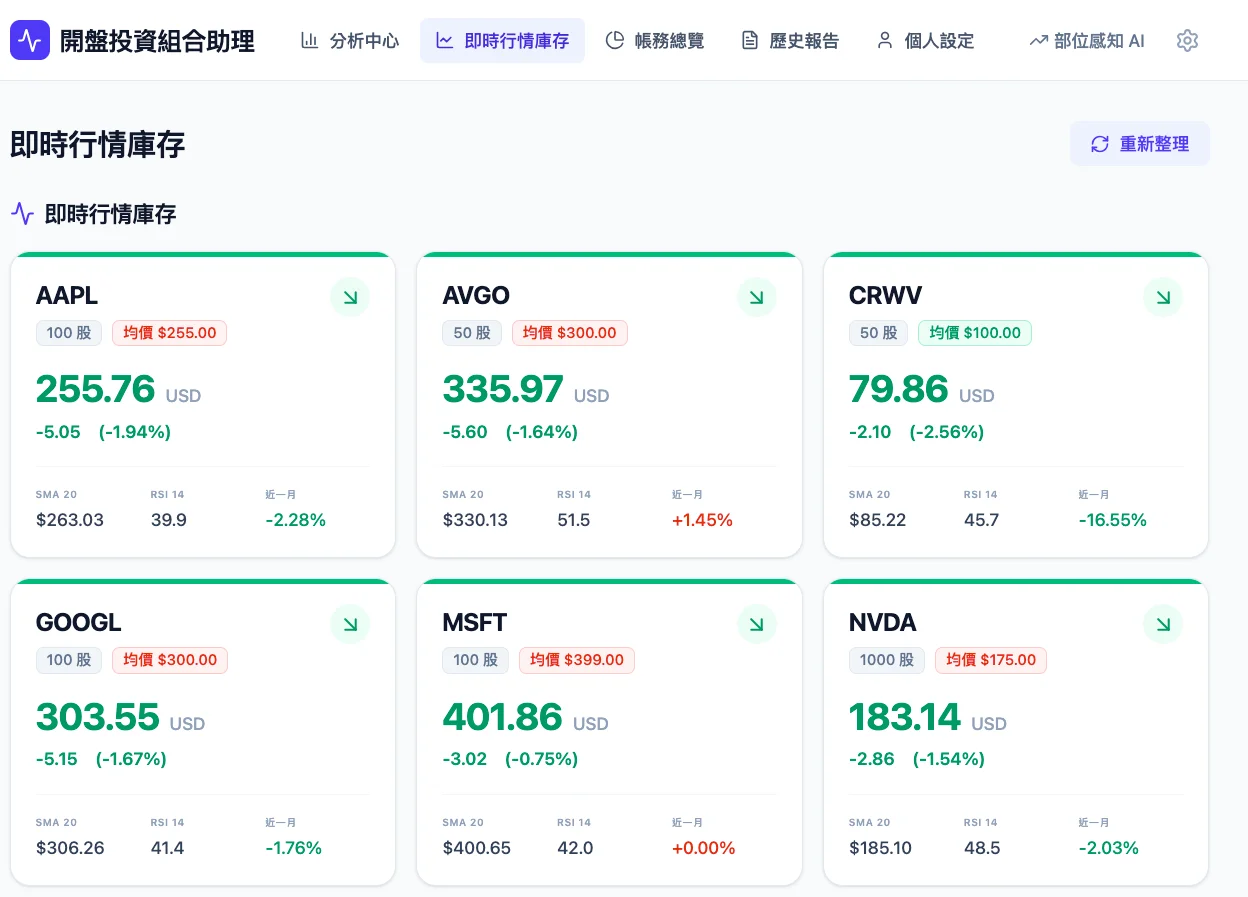
- Real-Time Market Holdings: Displays real-time prices, price changes, and comparisons with average prices based on your saved portfolio.
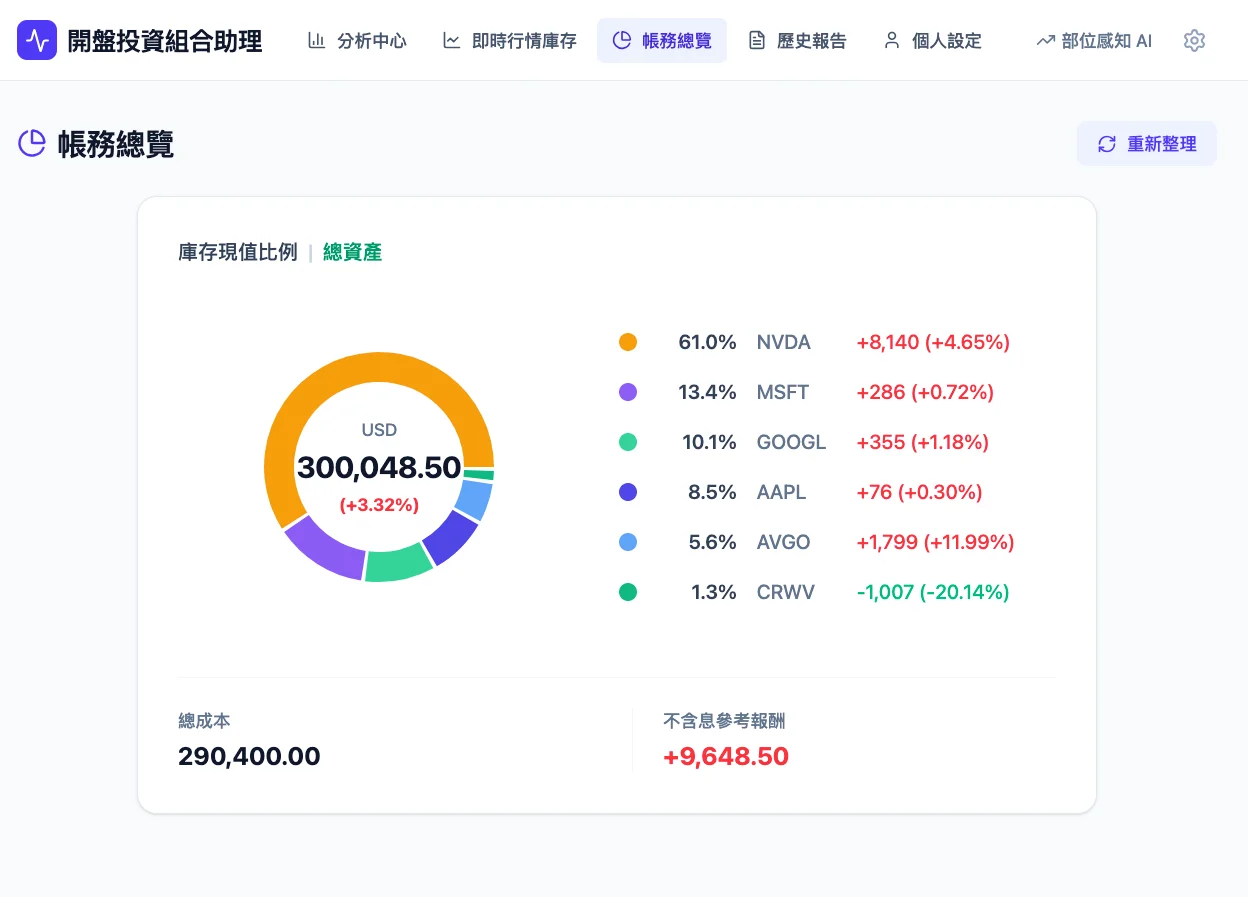
- Account Overview: Shows total portfolio cost, total market value, profit/loss, and return rate, with a pie chart visualizing position allocation.
- Historical Reports: Save single-stock/portfolio reports with support for viewing, downloading as PDF, and exporting as ZIP.
- Personal Settings: Manage portfolios (ticker, shares, average price) and investment strategies (growth/value/balanced); customize the Gemini API Key in system settings.
Interface Preview
The following sections match each functional area with actual screenshots and PDF examples to help you quickly understand the overall workflow.
Analysis Center
The Analysis Center home page provides a portfolio overview and access to analysis, displaying various analysis modes with image cards.
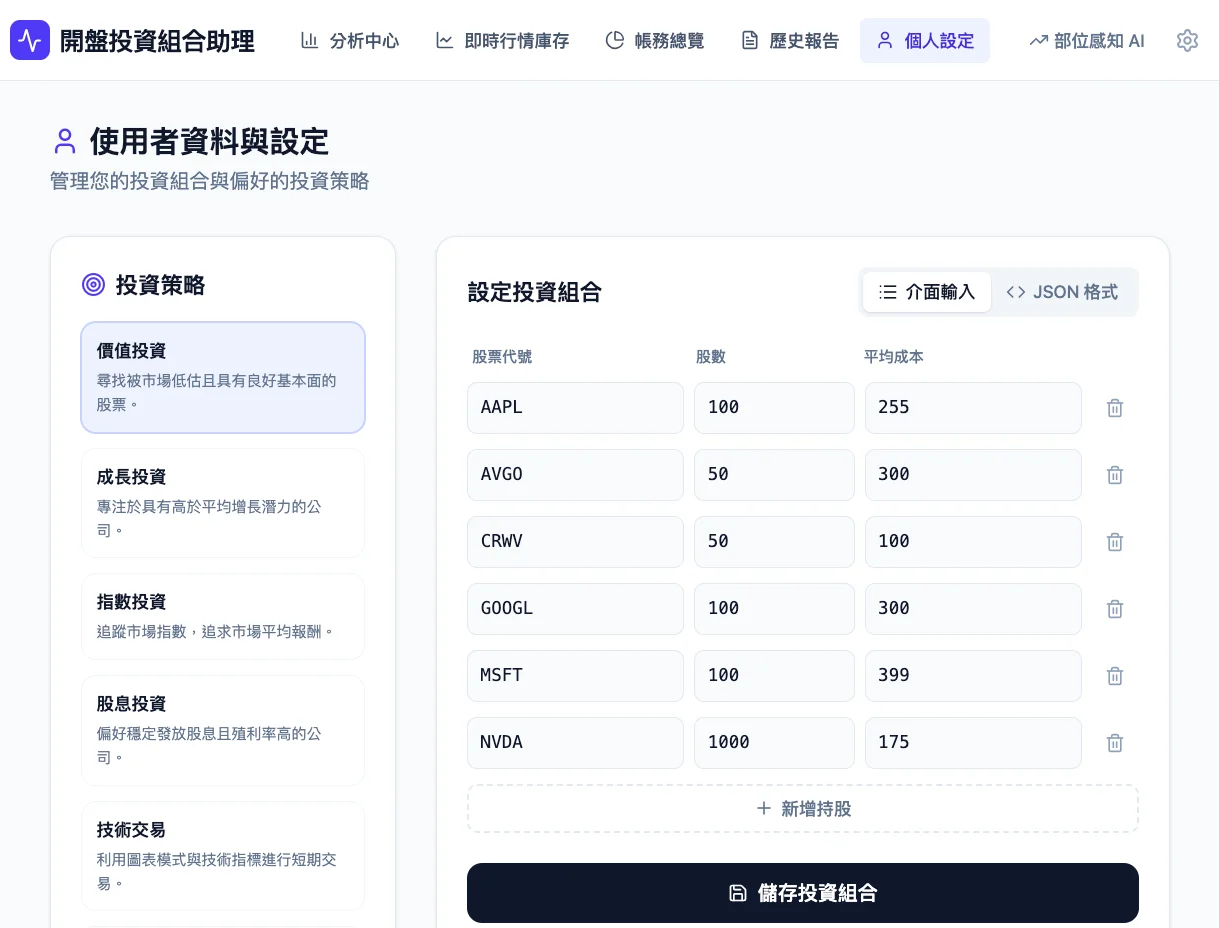
Portfolio Single Stock Report and Single Stock Guide
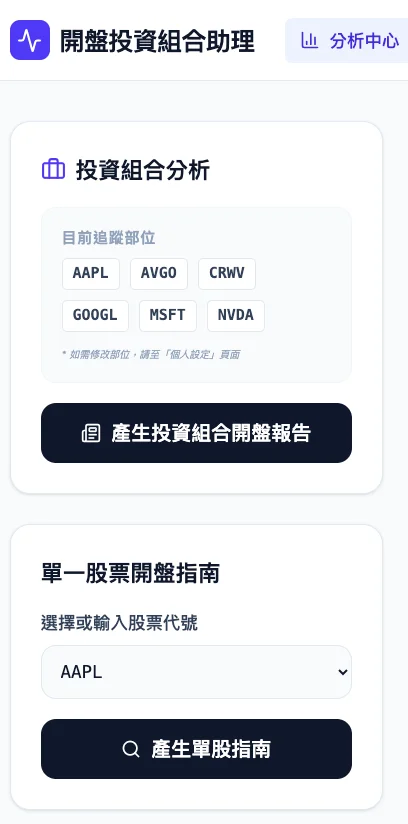
Single Stock Decision Dashboard
The Single Stock Decision Dashboard focuses on a single asset, integrating technical indicators, news, and position information to output structured recommendations.
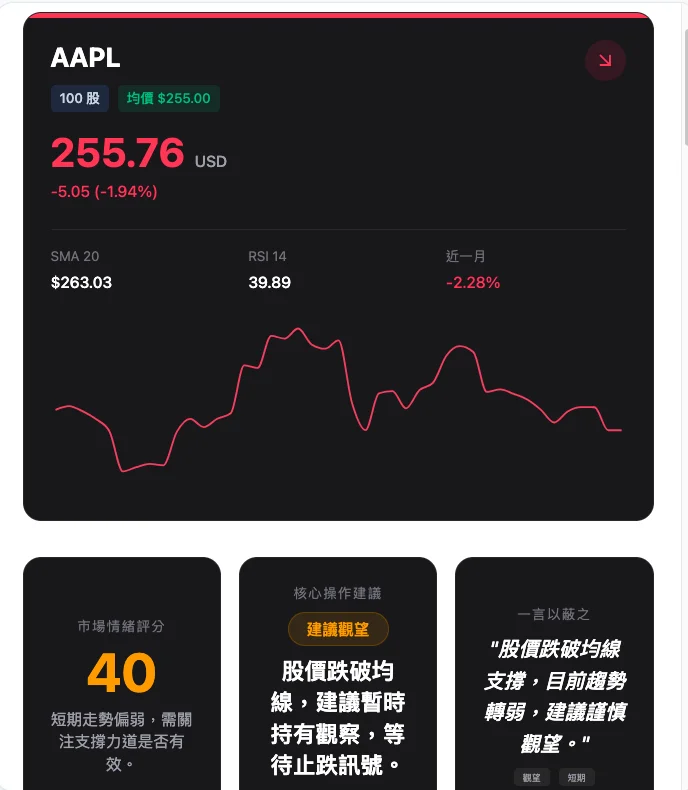
View the complete Single Stock Decision Dashboard PDF example (Apple)
Portfolio Opening Bell Report
The Portfolio Opening Bell Report centrally presents the daily risks and opportunities of multiple holdings, accompanied by market pulse and news summaries.
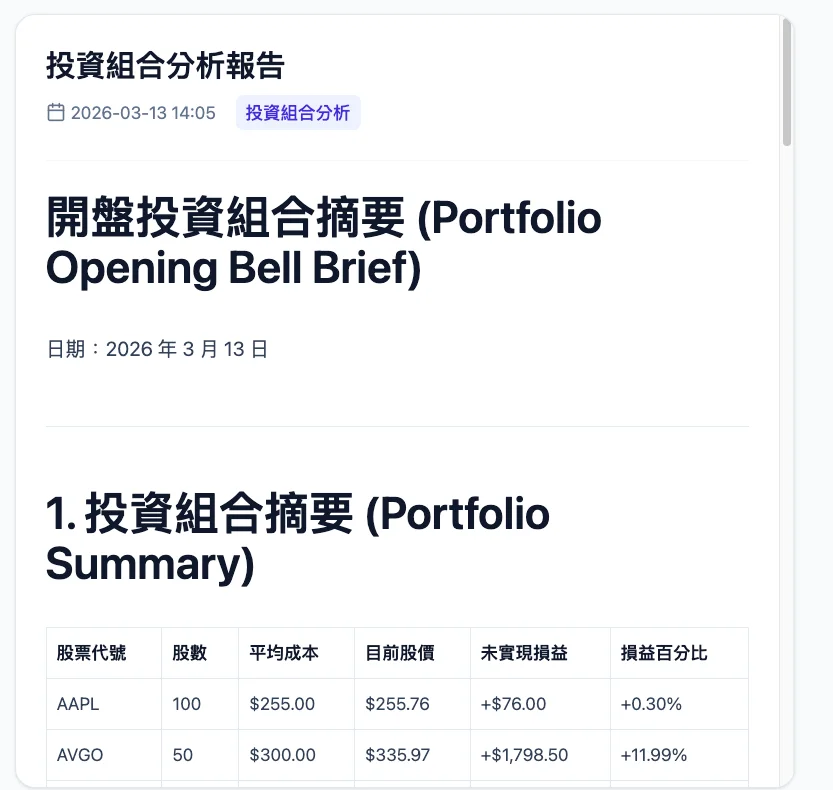
View the complete Portfolio Opening Bell Report PDF example
Real-Time Market Data and Accounts
The real-time market data and accounts section combines market watching and account information, including individual stock profit/loss, return rates, and position allocations.
Real-Time Market Data
Account Overview
Run Locally
Requirements: Node.js
-
Install dependencies:
npm install -
Create
.env.localand configure:VITE_GEMINI_API_KEY=<your_gemini_api_key> -
Start the development server:
npm run dev
Alternatively, you can enter a custom Gemini API Key in the “System Settings” within the application without writing to .env.local.
Technical Architecture and Data Flow
Data Sources and API Integration
-
Market Data and Technical Indicators (Stock Status)
The backend uses Yahoo Finance (yahoo-finance2) to fetch real-time and historical data for the AI to analyze “stock status”:- Real-Time Quotes:
quote(ticker)— current price, change, percent change, trading volume, market cap. - Historical Candlesticks: Daily charts for the past 60 days, used to calculate SMA20, RSI(14), 1-month return rate, and generate price trend chart data.
- Market Context:
/api/market-contextretrieves the percent change for NASDAQ (^IXIC) and S&P 500 (^GSPC) indices as market sentiment context.
- Real-Time Quotes:
-
Latest News
News sources use a dual-track approach with Gemini + External News APIs:- SERP API (SerpAPI): If a Serp API Key is provided in the system settings, the backend uses Google News search (
engine=google&tbm=nws) to fetch the latest relevant news for each asset (up to 3 items per asset), which are then sent to Gemini along with market data for summaries and risk alerts. - Yahoo Finance News: When no Serp API Key is set, it falls back to
yahooFinance.search(ticker, { newsCount: 3 })to fetch news for the asset, which is similarly compiled and sent to Gemini.
- SERP API (SerpAPI): If a Serp API Key is provided in the system settings, the backend uses Google News search (
-
AI Analysis (Gemini)
- Single Stock Decision Dashboard: Combines “real-time quote + SMA20/RSI/1-month performance + news + market context + user position (optional)” into a prompt. Uses structured output (responseSchema) to generate a JSON dashboard (trend, buy/sell recommendations, risks, support/resistance, etc.); the system instruction includes strict entry strategies, trend trading, chip and buying point rules, and requires Traditional Chinese output, prohibiting hallucinations and repetitive sentences.
- Portfolio Opening Bell Report: Fetches market data and news concurrently for multiple holdings, then calls Gemini to generate an opening summary and recommendations.
- The API Key can come from
VITE_GEMINI_API_KEYor a custom key from the in-app “System Settings”; the model is selectable (e.g.,gemini-3-flash-preview).
Backend and Frontend Responsibilities
- Backend (Express):
/api/market-data(market data + technical indicators),/api/news(SerpAPI or Yahoo news),/api/market-context(market indices); centralizes Yahoo and SerpAPI calls. The frontend only sends tickers and an optionalserpApiKey. - Frontend: Vite + React, calls the above APIs sequentially or concurrently, then sends the results along with user positions to the Gemini service (e.g.,
geminiService.ts), and is responsible for displaying, saving, and exporting the dashboards and reports as PDFs.