Project note
pdf2ppt: Convert NotebookLM PDFs to Editable PPTs
Python · PDF extraction · PaddleOCR · OpenCV · PowerPoint Reconstruction

Overview
pdf2ppt is an open-source tool designed to convert PDF slides into editable PowerPoint (.pptx) files. It is particularly well-suited for PDFs exported from NotebookLM, course handouts, research presentations, and various presentation-style documents. Its goal is not simply to wrap each page as a background image, but to preserve editable text, layout structure, and reusable page elements as much as possible.
The core value of this project lies in handling both “visual proximity to the original” and “subsequent fine-tuning in PowerPoint” within the same pipeline. For those who need to re-edit handouts, modify slide wording, or reuse existing layouts, this is far more practical than simply exporting screenshot-style PDF presentations.
Why This Project is Valuable
The problem with many PDF-to-PPT tools isn’t whether they can convert, but that they are almost uneditable after conversion. If an entire page is embedded as a single image, it may look close to the original, but it actually loses the editing value of PowerPoint.
The design philosophy of pdf2ppt is more pragmatic:
- If a page can have its text and layout extracted directly from the PDF, it prioritizes native parsing.
- Scanned pages, image-based pages, or hybrid pages are then handed over to PaddleOCR for processing.
- It first determines the page type (
digital,scanned,hybrid), and then decides the safest conversion method. - Background reconstruction uses a conditional strategy rather than roughly removing text from the entire page.
- Besides content recognition, OCR text processing also estimates font size, font color, and bold weight.
This makes it not just a simple exporter, but a conversion pipeline optimized for “editable presentation reconstruction”.
Core Workflow
The overall workflow can be summarized in five steps:
- First, determine whether native text and layout can be extracted directly from the PDF page.
- If the page leans towards being a scanned document or an image page, PaddleOCR is enabled for text recovery.
- The system categorizes pages into
digital,scanned, andhybridto avoid applying the same pipeline to all pages. - Background reconstruction is performed only when necessary, rather than erasing text across the entire page unconditionally.
- Finally, editable text boxes, background images, and layout information are reconstructed into a
.pptxfile.
This design offers two direct benefits:
- Balance between speed and quality: Pages capable of native parsing don’t waste OCR processing costs.
- Higher editability: Text isn’t baked into the background but is reconstructed as genuine PowerPoint elements as much as possible.
Project Status
- The currently recommended primary background engine is
opencv-fast. diffusion-localis still under active development and should be considered an experimental feature at this stage.- For most documents, it’s recommended to start with
opencv-fast, and then decide whether to trydiffusion-localbased on background complexity.
Showcase
The image below shows the original PDF slide on the left, and the converted editable PowerPoint on the right.
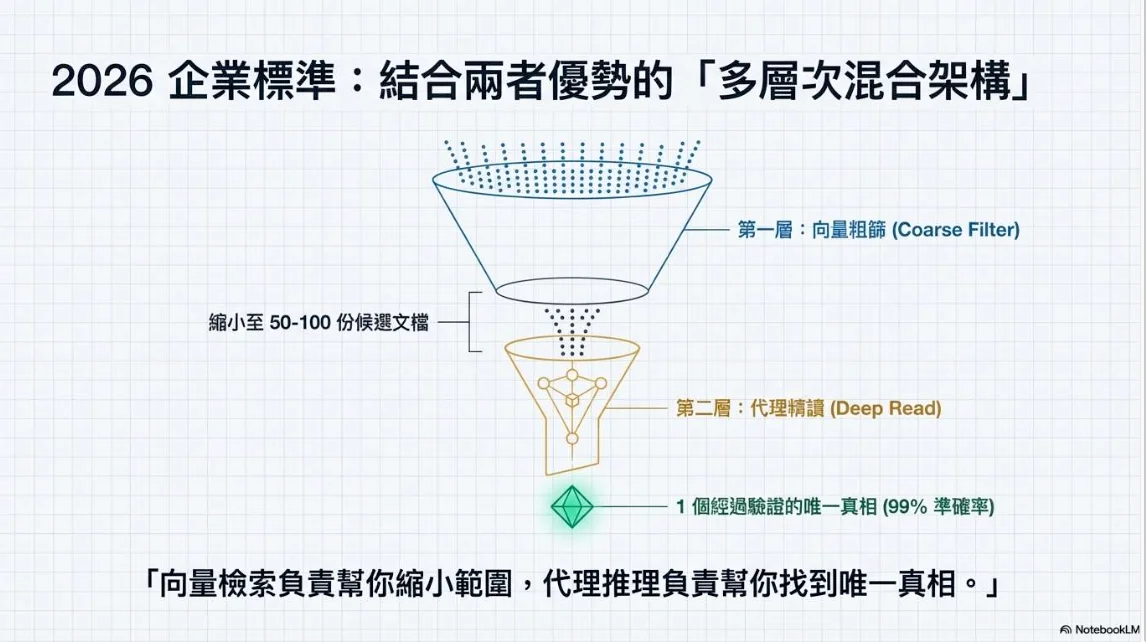
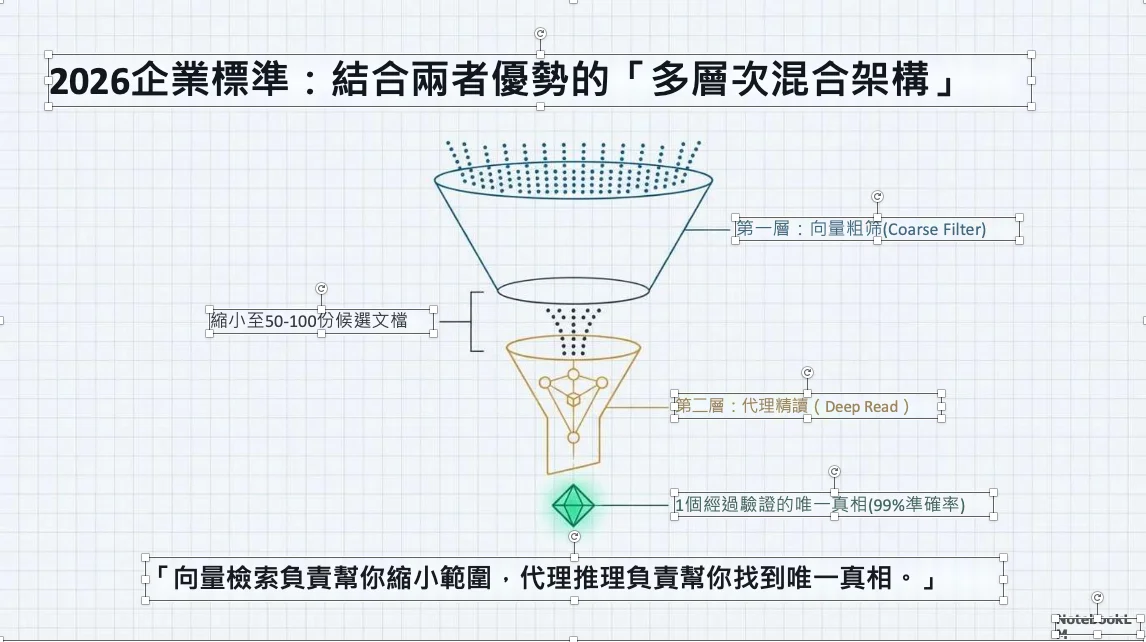
The left side is the original PDF, and the right side is the converted editable PowerPoint.
Main Features
- Convert PDFs to editable PPTX
- Prioritize preserving native PDF text
- Reconstruct scanned page text into PowerPoint text boxes
- Support for multiple background reconstruction engines:
white-boxopencv-fast(recommended primary choice)diffusion-local(experimental / under development)autoautomatic routing
- Output a JSON report for every conversion
- Output per-page debug images and analysis files, facilitating the inspection of OCR and background processing results
- CLI displays a per-page conversion progress bar
Use Cases
This tool is particularly suitable for the following scenarios:
- Re-editing NotebookLM exported PDFs: Generate a PDF using NotebookLM or other tools first, then convert it to an editable PPT for secondary organization.
- Reusing research presentations: Convert thesis slides or course slides into modifiable formats.
- Reconstructing scanned handouts: Convert content that is originally image-only into editable text boxes.
- Internal presentation workflow automation: Batch convert PDFs and output JSON reports to easily integrate with subsequent quality checks or pipelines.
Requirements
- Python 3.11 or higher
- Linux is recommended
- Dependencies are defined in
pyproject.toml - If using OCR, a standalone Conda environment is recommended with
numpy<2pinned. - OCR requires:
- PaddleOCR execution environment and model downloads
- If using local diffusion inpainting, the following are recommended:
- NVIDIA GPU
iopaintor other compatible local backends
Installation
The recommended OCR execution environment is as follows:
conda create -n ppocr python=3.12 numpy=1.26.4 -y
conda activate ppocr
python -m pip install -e .
Reasons for recommending this installation method:
PaddleOCR/PaddleXis currently more stable in environments withnumpy<2.- Using a standalone Conda environment reduces dependency conflicts with global packages like
pyarrowandscikit-learn.
If you already have an existing environment, please at least confirm it meets the NumPy restriction in pyproject.toml:
python -m pip install "numpy<2"
python -m pip install -e .
If you want to run tests, please install additionally:
python -m pip install pytestIf you want to use local diffusion inpainting, please install it separately and verify the backend can run normally. This project has currently validated the iopaint workflow. However, at this stage, diffusion-local is still an experimental feature, so it’s recommended to rely primarily on opencv-fast initially.
Quickly confirm if the environment is functioning normally:
python - <<'PY'
import numpy
print(numpy.__version__)
PY
python -m pdf2ppt input.pdf output.pptx
Quick Start
Basic conversion:
pdf2ppt input.pdf output.pptxSpecify report output path:
pdf2ppt input.pdf output.pptx --report output.report.jsonOutput debug files:
pdf2ppt input.pdf output.pptx --debug-dir output_debugUse OpenCV fast background reconstruction:
pdf2ppt input.pdf output.pptx \
  --inpaint-engine opencv-fast \
  --report output.report.json \
  --debug-dir output_debug
Technical Principles of opencv-fast
opencv-fast is the lightweight background reconstruction pipeline used on overlay pages in this project. Its focus is not on pursuing the flashiest generative effects, but on supporting most presentation scenarios with low cost, a low setup threshold, and sufficiently good background inpainting quality.
Its design goals are:
- No need to download models
- No GPU required
- Completed directly locally using OpenCV
- Usually produces the best results on solid colors, gradients, and simple textured slide backgrounds
The technical workflow is as follows:
- First, identify the text blocks that will later be reconstructed into editable PowerPoint text.
- Convert these text areas into binary masks using
build_text_mask_image(). - Optionally expand the mask using
--inpaint-padding-pxto cover anti-aliasing edges and situations where the OCR bounding box is slightly small. OpenCvFastInpaintingEngineconverts the page image into NumPy / OpenCV format.- Then it calls
cv2.inpaint(..., cv2.INPAINT_TELEA)to perform local inpainting with a small radius. - The inpainted image becomes the background, and then the editable text boxes are overlaid back onto the PowerPoint.
Implementation details:
- Inpainting algorithm: OpenCV Telea method (
cv2.INPAINT_TELEA) - Default radius:
3.0 - Mask format: 8-bit single-channel binary mask
- Image workflow: PIL RGB -> OpenCV BGR -> Telea inpainting -> PIL RGB
Why it’s fast:
- It relies on traditional image processing, not generative models.
- The core approach extrapolates surrounding colors and structures inward from the mask boundaries.
- The primary costs come from image dimensions and mask sizes, with no need for model loading or neural network inference.
Suitable scenarios:
- Solid color background presentations
- Slight gradient backgrounds
- Only simple textures or geometric shapes behind the text
- When you want to iterate rapidly and quickly preview conversion results
Less effective scenarios:
- Dense illustrations or photos behind the text
- Very large masked areas
- Complex patterns that cannot be reasonably restored using only neighboring pixels
- The removed text happens to overlap with important boundary lines, icons, or thin-line charts
Its relationship with auto routing:
- If the mask covers too large an area,
autowill fall back towhite-boxfor safety. - If the background complexity is low,
autowill prioritizeopencv-fast. - Complexity is estimated based on grayscale variance and edge density in the areas surrounding the masks.
- If complexity is high and the local diffusion backend is available,
autowill switch todiffusion-local, though this pipeline is currently still experimental.
Practical advice:
- General presentation PDFs can start with
opencv-fast. - If white edges or halos remain around the text, you can slightly increase
--inpaint-padding-px. - Switch to
diffusion-localonly when the background is truly complex enough, and you can accept experimental behavior.
Using the local diffusion backend:
pdf2ppt input.pdf output.pptx \
  --inpaint-engine diffusion-local \
  --diffusion-command iopaint \
  --diffusion-model runwayml/stable-diffusion-inpainting \
  --diffusion-device cuda \
  --report output.report.json
CLI Parameters
Main parameters:
input_pdf: Input PDF pathoutput_pptx: Output PPTX path--report: JSON report output path--mode:editable,fidelity,fast--lang: PaddleOCR language code, default isch--ocr-det-thresh: PaddleOCR text detection threshold, optional; if omitted, uses the official PaddleOCR default--ocr-det-box-thresh: PaddleOCR bounding box threshold, optional; if omitted, uses the official PaddleOCR default--ocr-drop-score: PaddleOCR recognition score threshold, optional; if omitted, uses the official PaddleOCR default--dpi: Page rendering DPI primarily used by OCR--background-dpi: DPI for full-page backgrounds and overlay backgrounds embedded in the PPTX--background-format: Background image output format,jpegorpng;jpeghas a smaller file size--background-jpeg-quality: JPEG quality used when--background-format=jpeg--debug-dir: Output folder for per-page debug images and analysis files--enable-doc-unwarping: Enable PaddleOCR UVDoc unwarping
Background reconstruction related:
--inpaint-engine:auto,white-box,opencv-fast,diffusion-local--inpaint-padding-px: Expand text masks before inpainting--inpaint-max-area-ratio: Force switch towhite-boxwhen the masked area is too large
Local diffusion parameters:
--diffusion-command: CLI command to call the backend, default isiopaint--diffusion-model: Model name passed to the backend--diffusion-device:cudaorcpu--diffusion-max-crop-edge: Maximum crop edge length sent to the backend--diffusion-complexity-threshold: Threshold for determining complex backgrounds inautomode--diffusion-timeout-sec: Timeout in seconds for each local diffusion backend call
Diagnostics related:
--log-level:DEBUG,INFO,WARNING,ERROR
Output file size adjustment suggestions:
- By default, background pages are now embedded as
JPEGwith quality82and110 DPI, which usually effectively reduces the PPTX size. - If you prioritize image quality, you can increase
--background-dpior switch to--background-format png. - If the file is still too large, you can further reduce
--background-jpeg-quality.
Conversion Modes
editable: Strikes a balance between editability and visual similarity.fidelity: More conservative, prioritizing visual proximity to the original.fast: Produces results quickly at a lower cost.
Background Reconstruction Strategies
This project does not universally remove text across the entire page, but chooses different modes based on the page’s condition:
elements: Attempts to preserve editable elements as much as possible, without generating a full-page background image.overlay: Reconstructs only the background beneath editable text.full-page: Falls back to a full-page image when the risk is too high.
In overlay mode, auto will conditionally choose:
opencv-fast: Suitable for simpler backgrounds.diffusion-local: Suitable for more complex backgrounds when the backend is available, but currently still an experimental path.white-box: Serves as a fallback solution when the mask is too large or the backend is unavailable.
Output Files
Common outputs are as follows:
output.pptx: Editable presentationoutput.report.json: Structured conversion reportoutput_debug/: Optional debug output
The JSON report will include:
- Page type classification
- Background mode
- Quality scores
- Actually used background reconstruction engine
- OCR / native text blocks and estimated styles
Notes and Limitations
- Reconstruction of OCR pages is inherently an estimation, not a complete semantic restoration.
- Complex charts and vector graphics currently lean towards preserving appearance, rather than being fully restored as editable chart objects.
- Recovery of bold weight and colors in OCR relies on heuristic judgments.
- Local diffusion quality is highly dependent on backend availability, GPU memory, and model selection.
Development
Run tests:
python -m pytest -qMain files:
- CLI:
src/pdf2ppt/cli.py - Core pipeline:
src/pdf2ppt/pipeline.py - Data models:
src/pdf2ppt/models.py
Documentation Language Versions
- English:
README.md - Traditional Chinese:
README_tw.md
License
This project uses the MIT License. See LICENSE for details.
Reference Links
- GitHub Project Homepage: poirotw66/pdf2ppt