Project note
PDF to Markdown Converter
FastAPI · PyMuPDF · Gemini Vision · Hybrid Parsing · Document Structuring

Overview
This project provides a complete solution for PDF to Markdown conversion. It comes with a built-in web frontend and a FastAPI backend API, allowing you to upload PDFs, preview them in real-time, compare the conversion results side-by-side, and download the Markdown with a single click. It adopts a hybrid parsing strategy (PyMuPDF fast path + Gemini Vision), automatically selecting the most suitable method based on the text density of the page. The generated Markdown can serve as prerequisite input for RAG, knowledge bases, and LLM parsing.
Why Markdown? The Role of Document Structuring
In document processing workflows, converting unstructured documents like PDF, Word, PPT, and images to Markdown is not traditional “data cleaning”, but rather a preliminary engineering step to standardize unstructured content and make it parsable.
- Markdown Preserves Structure — Lightweight representations such as headings, paragraphs, lists, tables, and links strike a balance between token costs and parsing convenience.
- LLMs Natively Understand Markdown — Mainstream models (like GPT and Gemini) are exposed to massive amounts of Markdown during training, enabling them to naturally parse its structure and semantics. It is suitable as an intermediate format for “Document → LLM”.
- High Token Efficiency — It has fewer tags compared to PDF/XML/HTML, which is beneficial for RAG, summarization, and QA.
- Structured but Not Complex — Heading levels, tables, and paragraph semantics are clear, facilitating RAG pipelines, embeddings, and index creation.
Therefore, the core of document structuring is to convert unstructured documents into the format that LLMs can best understand and parse most efficiently—Markdown.
Key Features
- PDF Upload and Conversion — Supports multiple prompt templates (slide / table / OCR / custom) for one-click conversion.
- Real-time Preview — PDF preview, Markdown rendering (e.g., Marked.js), and side-by-side comparison.
- One-click Download — Download the conversion results as a Markdown file.
- Customizable Prompt Templates — Built-in
slide,table,ocr, or you can directly input a custom prompt. - Hybrid Parsing Strategy — Uses PyMuPDF for rapid extraction on pages with high text density; uses Gemini Vision for structured extraction on pages with low text density or charts. The system automatically selects the method for each page.
Project Structure
pdf-to-markdown-converter/
├── app/
│   ├── main.py              # FastAPI main program
│   ├── config.py            # Configuration (.env)
│   └── api/
│       └── pdf_convert.py   # PDF conversion API
├── src/utils/
│   ├── pdf_parser.py        # PDF parser (hybrid strategy)
│   ├── pdf_cache.py         # PDF caching mechanism
│   ├── md_exporter.py       # Markdown exporter
│   ├── prompts.py           # Prompt template management
│   ├── logging_config.py    # Logging configuration
│   └── retry.py             # Retry mechanism
├── static/                  # Frontend interface
│   ├── converter.html       # Main page
│   ├── css/style.css
│   └── js/main.js           # Frontend logic
├── requirements.txt
├── ENV_EXAMPLE.md           # Environment variable examples
└── README.md
Technical Architecture
Parsing Strategy
- PyMuPDF Fast Path — Directly extracts text from pages with high text density, offering high speed and low cost.
- Gemini Vision — Performs structured extraction via the AI vision model for pages with low text density or containing charts/layouts.
- The system automatically selects the path for each page based on a text density threshold (configurable via
PDF_TEXT_DENSITY_THRESHOLD).
Main Dependencies
- Web — FastAPI, Uvicorn
- PDF — PyMuPDF (fitz), pdf2image, Pillow (requires poppler installed on the system)
- AI — google-generativeai (Gemini Vision)
- Configuration — pydantic-settings, python-dotenv
- Logging — loguru
- Frontend — Native HTML/CSS/JavaScript, Marked.js for rendering Markdown
Core Features and Mechanisms
- Intelligent text density detection, automatic caching (optional, supports resuming from breakpoints)
- Retry mechanism and circuit breaker, multi-process image conversion + multi-threading API calls
- Rate limit protection, structured logging
Environment Variables and Startup
At a minimum, you must configure GOOGLE_API_KEY and GEMINI_MODEL (e.g., gemini-2.5-pro); optionally, you can include the PDF threshold, cache directory, log level, API port, etc. See ENV_EXAMPLE.md in the repo for details.
Startup command: uvicorn app.main:app --reload --host 0.0.0.0 --port 8000. Frontend interface: http://localhost:8000/; Conversion API: POST /api/v1/convert-pdf (can pass file and prompt_template).
Conversion Example
Below is an example of a converted presentation PDF: a screenshot of the original page and the corresponding Markdown output (preserving page numbers, headings, lists, and architectural descriptions).
Conversion Result Preview
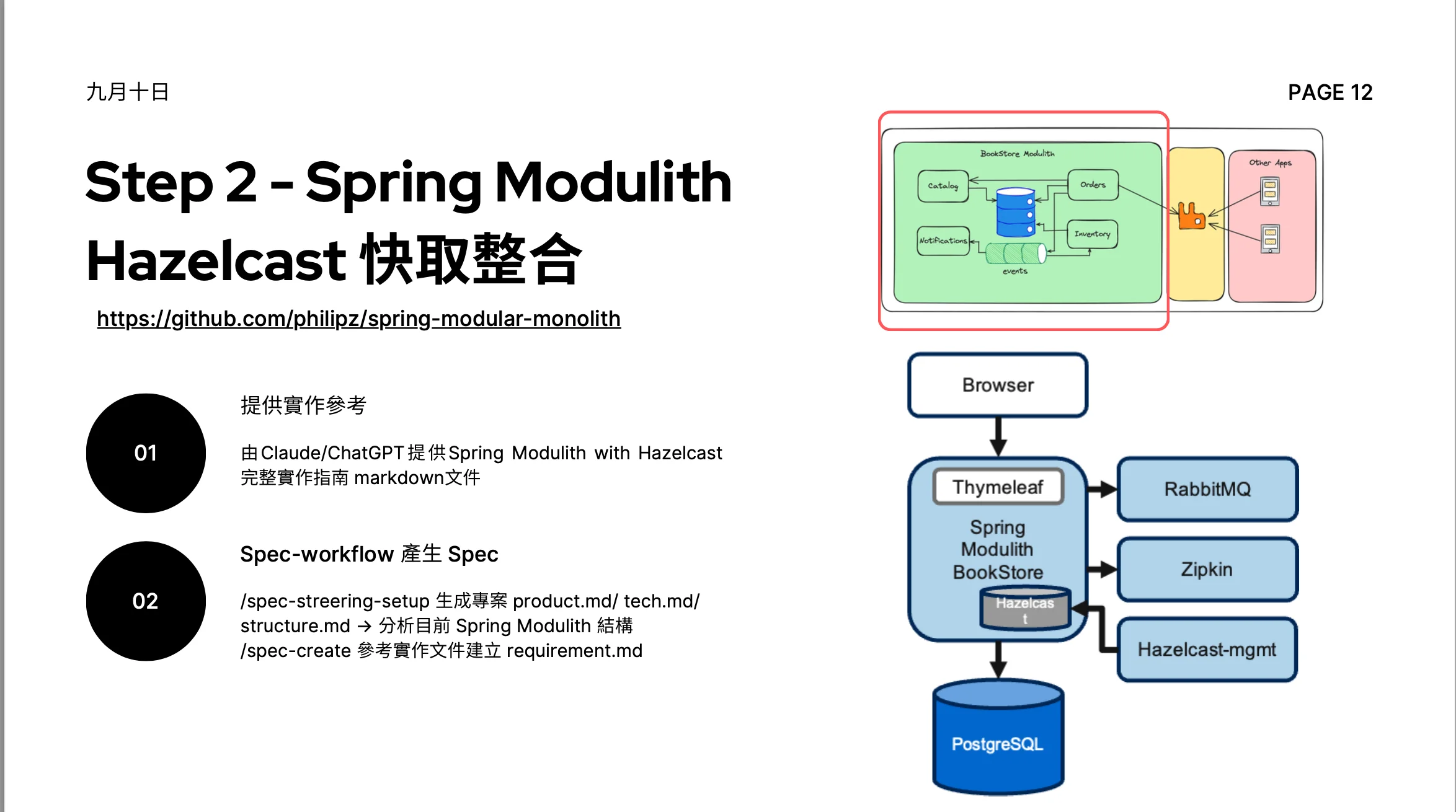
Output Markdown Snippet (preserves heading hierarchy, lists, and links)
## Page 1

**Method:** gemini_vision

# Step 2 - Spring Modulith Hazelcast Integration

https://github.com/philipz/spring-modular-monolith

1.  **Provide Implementation Reference**
    - Provide the complete implementation guide markdown document for Spring Modulith with Hazelcast generated by Claude/ChatGPT.

2.  **Generate Spec with Spec-workflow**
    - `/spec-streering-setup` generates project `product.md`/`tech.md`/`structure.md`, then analyzes the current Spring Modulith structure.
    - `/spec-create` creates `requirement.md` referring to the implementation document.

## Architecture Diagram Analysis

### BookStore Modulith Internal Structure

This architecture diagram illustrates the internal modules of the BookStore Modulith and their interaction relationships.
- **Main Modules**: Catalog, Orders, Notifications, Inventory
- **Data and Events**: Each module interacts with the central database and event queue.
- **External Integration**: The BookStore Modulith communicates with external "Other Apps" through middleware.
Use Cases
- RAG Systems — Convert PDFs to Markdown for embedding and retrieval.
- AI Analysis — Provide structured document content for LLMs.
- Document Processing — Batch convert PDFs to produce structured content.
- Knowledge Base Construction — Convert unstructured documents into indexable Markdown format.
Deployment
The project can be deployed to Render (providing Dockerfile and render.yaml). The free tier has a 15-minute inactivity sleep and a 750-hour monthly limit; you can opt for paid plans to get no-sleep and more resources. Users can input their own Gemini API key on the frontend, or set a fallback key in the Render environment variables. See the deployment instructions in the repo for details.