Field guide
What Is PixelRAG: Retrieval Over Webpage Screenshots
Move past lossy HTML/PDF parsing and give LLMs eyes that can directly read page structure

In the current field of Retrieval-Augmented Generation (RAG), the vast majority of systems rely on the “parse-extract-retrieve” text-based pipeline: parsing PDFs, web pages, or images into plain text, chunking them, and then building an index through a text embedding model before finally passing them to a Large Language Model (LLM) to answer.
However, this traditional text-based RAG has an unavoidable “information cliff”:
- Loss of structured information: Complex tables, multi-column layouts, mind maps, and flowcharts are often completely disorganized and lose their context when converted to plain text.
- Discarding of multimodal content: Visual elements such as charts, statistical graphs, and design drafts cannot be represented through text.
- Parsing is extremely expensive and error-prone: In order to preserve tables and structure as much as possible, developers have to use complex PDF parsers (like PDFPlumber, Unstructured) or OCR tools, which are extremely time-consuming and yield mixed results.
PixelRAG, proposed by institutions such as UC Berkeley (UC Berkeley SkyLab & BAIR & NLP), completely subverts this status quo. It proposes a “Pixel-Native” visual retrieval and generation framework: directly rendering documents into screenshot slices, utilizing a fine-tuned Vision-Language Model (VLM) embedding model for end-to-end retrieval, and then passing them directly to a multimodal large model (VLM Reader) to read the screenshots and answer.
According to the paper, PixelRAG improves accuracy by about 18.1% over text-based RAG on traditional text QA tasks, and naturally supports complex web pages and PDFs rich in charts.
The following provides an in-depth analysis of its source code design and core technological innovations according to §1 Pipeline & Architecture → §2 Chromium High-Throughput Rendering → §3 GPU-Accelerated Preprocessing → §4 LoRA Fine-Tuning Recipe → §5 Claude Agent Integration.
§1 Pipeline: Five-Stage Pixel-Native Pipeline
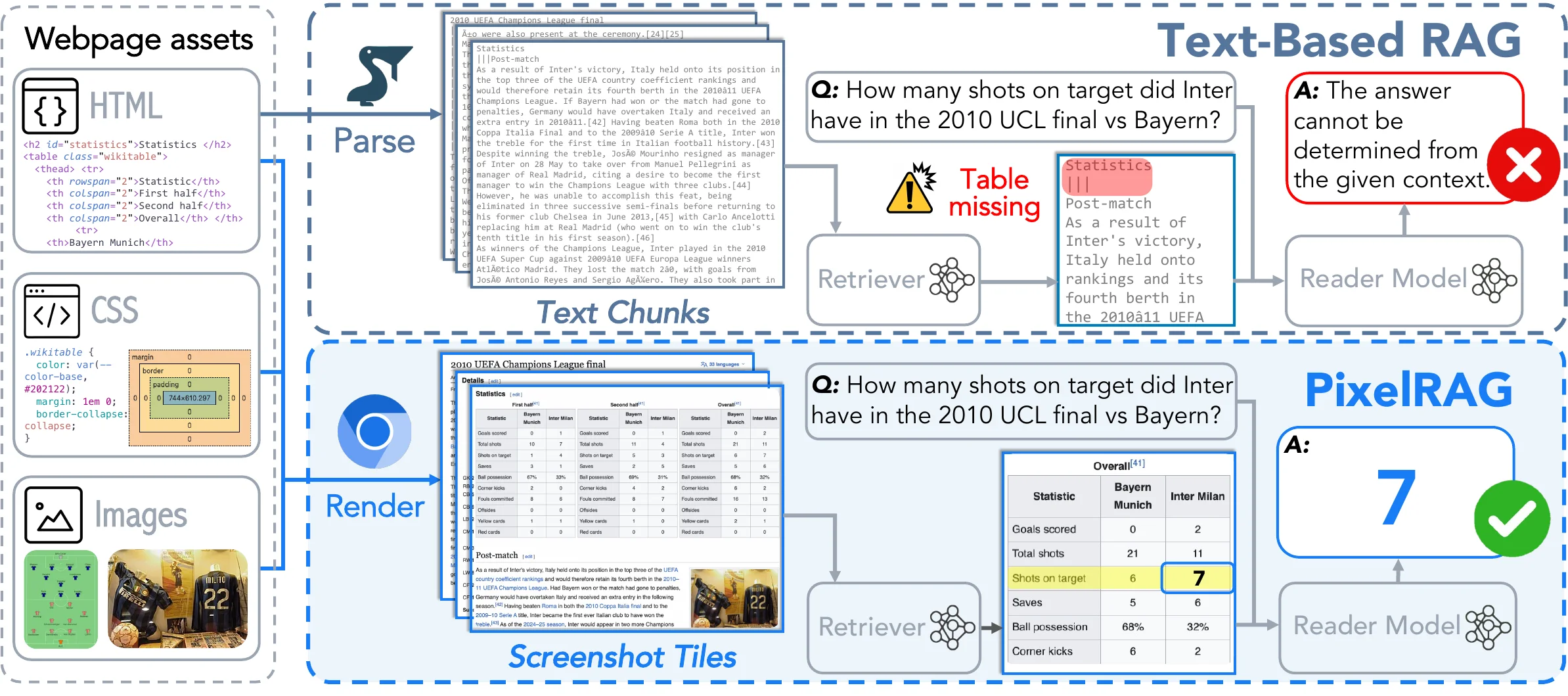
The complete operational flow of PixelRAG can be divided into the following five core steps:
- Render: Utilizes a high-performance headless browser to render and screenshot web pages/PDFs, corresponding to the render_url entry point in render.py.
- Chunk: Slices ultra-long screenshots into standard fixed-height slices suitable for VLM input, implemented by chunk_article in chunk.py.
- Embed: Generates dense vectors through a dual-tower visual embedding model, managed by embed.py.
- Index: Builds a vector search index using FAISS, encapsulated in api.py.
- Serve & Read: Provides API retrieval services, retrieving matching image chunks through the search interface, and finally feeding them into a multimodal large model for reading and answering.
                    ┌─────────────────────────┐
                    │  Web / PDF Source File  │
                    └────────┬────────────────┘
                             │
            [Render]         ▼
        [chromium] ──► Browser high-performance rendering screenshot (875x8192)
                             │
            [Chunk]          ▼
   [chunk_article] ──► Vertically sliced into 1024px height image tiles
                             │
            [Embed]          ▼
    [_init_direct_gpu] ──► GPU-accelerated preprocessing + Qwen3-VL-Embedding
                             │
            [Index]          ▼
        [api.py]   ──► Build FAISS IVF index database
                             │
            [Serve]          ▼
        [search]   ──► Receive text/image Query to retrieve Top-K image chunks
                             │
            [Read]           ▼
        [vLLM / VLM]──► Vision model directly reads images to generate answers
§2 Chromium Custom High-Performance Rendering (109 tiles/s)
For large-scale visual RAG, the biggest engineering bottleneck lies in the throughput of rendering screenshots. When facing millions of web pages, traditional headless browsers (such as Puppeteer, Playwright) usually have a throughput of only a few images per second due to the overhead of cross-process IPC communication, Base64 serialization transmission, network waiting, and disk writing.
The PixelRAG team conducted custom development deeply within the Chromium foundation; the modified patches can be found in chromium-screenshot-patches.diff, and they documented their optimization route in screenshot-throughput-optimization.md. Through this series of optimizations, they achieved an ultra-high end-to-end rendering write throughput of 109 tiles/s (a 5.5x performance improvement):
| No. | Optimization Method | Throughput | Improvement vs Baseline | Key Principle |
|---|---|---|---|---|
| 0 | Baseline (Playwright, polling wait 30ms) | 20 t/s | — | Node.js IPC bridge layer overhead |
| 1 | Direct CDP websocket communication | 23 t/s | +14% | Bypassing Playwright encapsulation |
| 2 | fonts.ready event-driven | 28 t/s | +22% | Deprecating timer polling, changed to font/image event triggers |
| 3 | Custom rawFilePath patch | 33 t/s | +18% | Bypassing Websocket Base64 encoding transmission |
| 4 | Multi-browser processes (48 workers) | 79 t/s | +140% | Fully utilizing multi-core CPU performance |
| 5 | Phased coordination and semaphore control | 96 t/s | +22% | Reducing screenshot hardware contention under high concurrency |
| 6 | .jpg Chromium built-in encoding | 109 t/s | +15% | Completing JPEG compression directly to disk within the Chrome ThreadPool |
2.1 Direct Disk Writing with rawFilePath
Traditional browser screenshots require converting the image to Base64 encoding via the Chrome DevTools Protocol (CDP), then sending it to a Node.js/Python process via Websocket for secondary decoding and saving.
PixelRAG extended the Page.captureScreenshot interface in the Chromium source code to support passing the rawFilePath attribute. After the Chromium rendering thread obtains the raw BGRA pixel data, it uses its internal ThreadPool to asynchronously write it directly to a shared memory disk mounted in memory (/dev/shm). The Python client only receives a “write complete” signal, completely eliminating the bandwidth bottleneck of Websocket serialization and data transmission.
2.2 Asynchronous JPEG Encoding in Chromium Internal ThreadPool
If lossless PNG is saved directly, the disk write volume is large and subsequent compression is slow. The PixelRAG patch makes Chromium detect the rawFilePath suffix. If it is .jpg, it automatically calls Chromium’s internal high-performance JPEG encoder to complete the compression in the asynchronous worker thread pool at the bottom layer of Chromium. This not only avoids the single-thread bottleneck on the Python side but also greatly reduces the E2E time consumption.
2.3 directClip and Lightweight ForceRedraw
When chunking and screenshotting ultra-long pages, the traditional approach is to continuously change the Viewport and scroll the page. However, PixelRAG introduced directClip, which can copy a specified rectangular area directly from the current Surface (CopyFromSurface) without changing the viewport or simulating state.
To solve the race condition issue where about:blank or an unrendered interface might be captured under high concurrency, it added a lightweight ForceRedraw mechanism before CopyFromSurface to ensure that the Compositor has submitted the latest frame, guaranteeing a 100% capture accuracy rate.
§3 GPU-Accelerated Image Preprocessing and Chunking
Document screenshots (e.g., 875×8192 px) typically have an extremely long vertical span. Directly inputting them to the VLM embedding model will lead to an exponential increase in the number of visual Tokens, which not only consumes VRAM but also disperses the model’s focus.
3.1 Vertical Slicing Strategy (Pre-chunking)
In the chunk_article function of chunk.py, PixelRAG vertically slices large screenshots into standard small slices of 1024px height. During slicing, it designed a mechanism to merge tiny tails (if the remaining pixels are less than 28px, they are directly merged into the previous slice to avoid producing small strips that cannot be properly chunked by the VLM). Through this chunking strategy, the number of visual Tokens is reduced by nearly 8 times, and throughput and retrieval accuracy are greatly improved.
3.2 GPU-Level Preprocessing Acceleration (60x Acceleration)
When generating vectors offline on a large scale, the loading, cropping, scaling, and normalization (Preprocessing) of images often become a fatal CPU bottleneck.
In _init_direct_gpu of embed.py, PixelRAG ingeniously moves the transformers’ Processor preprocessing operations to the GPU (i.e., processing tensors directly on the CUDA device). This causes the image preprocessing time for a single batch (Batch Size = 64) to plummet from 12 seconds on the CPU to 0.2 seconds on the GPU, thus allowing the VRAM to remain in a highly efficient state of being fully utilized.
§4 Dual-Tower Visual Embedding LoRA Fine-Tuning Recipe
The visual retrieval model used by PixelRAG is deeply fine-tuned via LoRA based on Qwen/Qwen3-VL-Embedding-2B. To solve the problems of “the visual model only recognizing images and not plain text Queries” and “easily confusing web pages with similar layouts,” the team designed a very ingenious training recipe (for code details, see train_contrastors.py):
4.1 Text Warmup
In the first 50 steps of visual contrastive training (--text-warmup-steps 50), the model is initially fed only plain text Query → plain text Passage paired data for training. The purpose of this stage is to prevent the model from losing its language understanding and alignment capabilities for complex text Queries after exposure to a large number of screenshot images.
4.2 Hard Negative Mining
For visual web page screenshots, the navigation bars, backgrounds, and even sidebars of many web pages are completely identical, with differences only in a few numbers or charts in the main body. If simple In-batch Negatives are used, the model can easily take shortcuts and judge similarity solely through the page framework. During the data preparation phase, PixelRAG mined 2 visually extremely similar but actually irrelevant Hard Negatives for each Query. When calculating the contrastive learning loss, it forces the model to focus on the text details in local areas of the image (e.g., specific values in a table), thereby increasing the QA score from 0.715 to 0.785.
4.3 GradCache Gradient Caching Optimization
Contrastive learning requires as large a Batch Size as possible to achieve optimal results, but when training a Vision model that easily contains thousands of Tokens, the VRAM is extremely prone to OOM (Out of Memory). train_contrastors.py integrates GradCache technology. It splits a large Batch (like 64) into multiple small chunks (like 4) to perform forward propagation sequentially and cache activation values, and finally uniformly performs backward propagation and gradient updates. This makes it mathematically equivalent while allowing training to use massive contrastive Batches even on the limited VRAM of a single H100.
§5 The Eyes of AI Agents: Claude Code pixelbrowse Plugin
In addition to serving as a large-scale visual RAG platform that can be deployed privately, PixelRAG can also serve AI terminals in the form of a lightweight plugin. In SKILL.md, PixelRAG provides the pixelbrowse skill plugin adapted for Claude Code.
When an Agent tries to scrape a modern SPA (Single Page Application, such as a website written in React/Vue), it often encounters the following awkward situations:
- The fetched HTML is a mess of JS Bundle
<script>tags without any main text. - A massive amount of CSS class names and DOM nesting extremely depletes Token context.
- Complex statistical charts are merely a
<canvas>tag in the DOM tree, rendering the Agent completely unable to see the data.
With the pixelbrowse skill, Claude can directly call the local pixelshot command to take and read screenshots:
pixelshot https://news.ycombinator.com --output /tmp/pixelbrowse --tile-height 1568 --wait-network-idleThen, it can directly use the Vision interface to read /tmp/pixelbrowse/xxx.png.tiles/tile_0000.jpg.
💡 Core Tips for Agent Image Reading
- The Secret of
--tile-height 1568: The visual limit for multimodal models like Claude 3.5 Sonnet is that when a single side of an image exceeds 1568px, the model internally automatically performs a proportional downscale on it. If an ultra-long image of 8192px is captured directly, the text will blur into a mosaic after downscaling and become completely unrecognizable. Therefore, the slice is forced to be limited to a height of 1568px here, ensuring that every pixel of text is absolutely clear. --wait-network-idleSolves the SPA Blank Issue: Since most modern web pages are asynchronously rendered on the client side, if the browser screenshots just by waiting for theDOMContentLoadedevent, it might capture a skeleton screen. This parameter makes the browser wait an additional 500ms of network idle time to ensure that dynamic charts and JS data are fully loaded and presented.
§6 Conclusion
From engineering optimizations (custom Chromium rendering foundation, GPU preprocessing acceleration) to algorithmic design (dual-tower fine-tuning, Text Warmup, GradCache), PixelRAG provides a very mature, production-grade solution for building RAG in the multimodal era. It makes us realize: Sometimes, letting AI “take a look” at a web page is indeed much more elegant and accurate than painstakingly trying to parse the HTML source code.
Reading path
- Return to the Enterprise RAG guide to place visual retrieval inside the wider retrieval, reranking, access-control, and evaluation pipeline.
- Read Open Knowledge Format to compare preserving rendered pages with packaging knowledge into a portable representation.
- Then use GraphRAG to compare pixel similarity with explicit relationship traversal.
Related engineering notes
- Cloud & Platform What Is OKF: Google's Format for Enterprise Knowledge Agents Can Read Introduces Google Cloud's Open Knowledge Format: why files plus YAML serve as the agent knowledge interface, and what OKF is not.
- Cloud & Platform What Changed in OKF 0.2: Provenance and Attested Computation Compares OKF v0.1 and v0.2: provenance, attested computation, source reputation, and the verified family. This article covers what changed—not an OKF primer.
- AI Engineering LangChain OpenWiki: The Automated Code Documentation Manager Tailored for AI Agents An in-depth exploration of LangChain's latest open-source tool, OpenWiki. From the underlying Git Diffs tracking mechanism to the brand-new 'OpenWiki Brains' proactive memory, comprehensively analyzing how to build an exclusive codebase documentation system that reduces Token consumption for AI Coding Agents.